Monitor Loop Progression in the Knime Console - Example Workflow
Hi KNIME community!
I wanted to share a helpful method, including an example workflow, for tracking loop progress in KNIME, which is especially useful in long-running workflows or when using Parallel Chunk Loop Nodes.
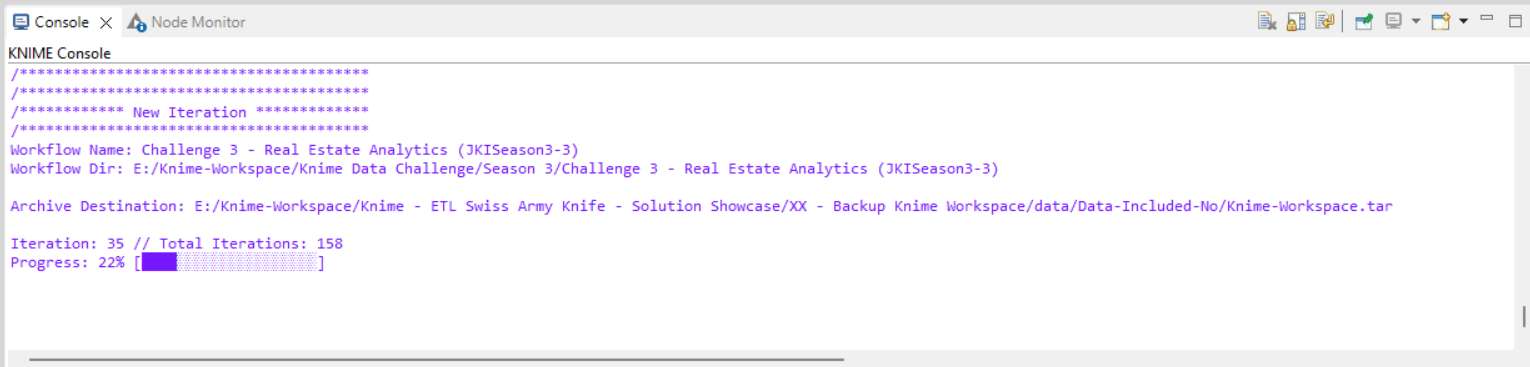
This approach uses a Java Snippet node to create a console-based progress bar that updates on each loop iteration. With this progress indicator, you can:
Monitor loop progress in real-time.
Debug potential bottlenecks.
Gain insight into resource distribution in parallel executions.
Here’s a quick example of the Java code for the progress bar:
int progressPercentage = (int) (((v_currentIteration + 1) / (double) v_maxIterations) * 100);
StringBuilder progressBar = new StringBuilder("[");
int totalBars = 20; // Number of segments in the progress bar
int completedBars = (progressPercentage * totalBars) / 100;
// Add completed segments
for (int i = 0; i < completedBars; i++) {
progressBar.append("\u2588");
}
// Add remaining segments
for (int i = completedBars; i < totalBars; i++) {
progressBar.append("\u2591");
}
progressBar.append("]");
// Log the warning with the progress
logWarn(
"


/****************************************
/****************************************
/****************************************" +
"
/************ New Iteration *************" +
"
/****************************************
" +
"Iteration: " + v_currentIteration + " // Total Iterations: " + v_maxIterations + "
" +
"Progress: " + progressPercentage + "% " + progressBar.toString() + "


"
);
If you’re running loops in parallel, this setup can also help monitor each chunk’s progress separately, making it easier to manage and debug complex workflows.
Here is the example workflow:
Feel free to reach out if you have questions or improvements to share! :blush:
Read my full blog post on my homepage:
https://atmedia-marketing.com/en/knime/knime-loop-debugging-and-progress-tracking/
Best
Mike