Using %userprofile% in a File Path
I am trying to create a workflow that ends with writing an Excel file to the current users Windows Download folder. Typically, c:\Users\username\Downloads. I built the string in a String Manipulation (Variable) node shown below.
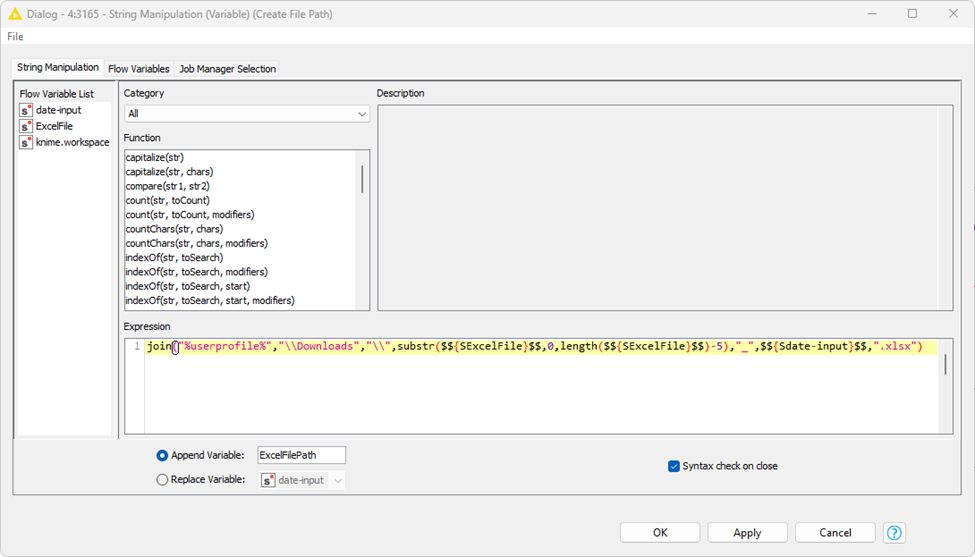
I tried to build the path using %userprofile% which windows will translate to C:\Users\username.
The flow variable after this step creates.
"%userprofile%\Downloads\ExcelFile_2024-02-07.xlsx"Which looks good.
I convert that to a path using String to Path (variable) and it creates.
“(LOCAL,
%userprofile%\Downloads\CQAActiveEmployees_2024-02-07.xlsx)”
Which still looks good.
When that path gets fed into the Excel Writer, I get the following error.
“Execute failed: The directory ‘C:\Users\username%userprofile%\Downloads’ does not exist and must not be created due to user settings.”
This is odd because it looks like Knime translated %userprofile% to “C:\Users\username” properly but did not take the alias out of the path.
What am I doing wrong? Is there a better way to reference the current users Download folder in Windows?