User-driven column mapping and type validation without empty-table warnings 🚨
Hello everyone 👋,
I’m currently developing a component for an open-source project at university and using Version 5.12.0 LTS (Build June 15, 2026). The workflow includes a few validation steps, and I’d appreciate some feedback on two questions regarding the design. I’ve translated everything from German into English by hand, if anything is still ambiguous, please feel free to get in touch.
My first block, which comes before the analysis and in which the input data is checked, currently consists of four parts:
Checking the number of columns,
Checking the column names,
Checking for missing values, and
Reviewing time formats.
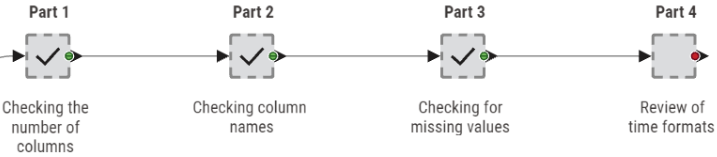
Each check produces a flow variable (1 = passed, 0 = failed) that controls a CASE Switch, so the workflow either continues or stops with a numbered error message describing what is missing or wrong (triggered by Java Snippet nodes via user interaction or Breakpoint nodes). The workflow expects a fixed set of six input columns: two identifier columns and four time-related columns and has been running smoothly so far, but two questions one question regarding its design has come up where I'd be grateful for help.
I. Type validation without empty tables and resulting warnings
The time-format check (part 4 metanode) inspects the data types of the four time-related columns (String or Time-metanode). For this, I use an Extract Table Spec node followed by a GroupBy on the column type, which produces a list of column names per type. A Rule-based Row Filter then keeps only the rows where the column type matches “org.knime.core.data.time.localtime.LocalTimeCell” (the expected time type).

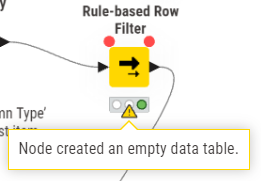
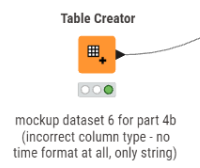
Problem: If none of the time columns is of the expected type (e.g., all of them are strings as shown in the lower ‘mock-up dataset 6 for part 4b’ of the workflow), the Rule-based Row Filter outputs an empty table. I currently handle this with an Empty Table Switch-node by checking whether the incoming table is empty and, if so, replacing it with a dummy one-cell table, so the workflow can continue and the subsequent Java Snippet can display a proper error message. This works, but it produces a warning every time the empty-table case occurs, plus extra handling code just to keep the flow alive! In the final version, I'd like to get rid of such unnecessary warnings.
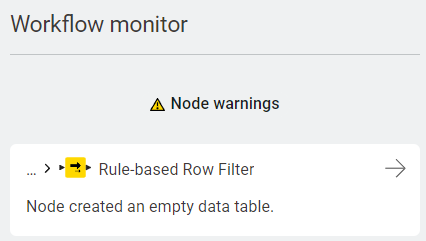
What I'm looking for: A way to validate the column types that also works when zero columns match the expected type (no empty-table warnings), and ideally reports which of the expected columns have the wrong type and what type they actually have (the last point mentioned has already been partially implemented and could be reused).
[1] test data v53.knwfMany thanks in advance for any hints, node recommendations, or example workflows!
II. User-driven column mapping instead of hard-coded name validation (my solution is in the comments)
Current state: The name check (part 2 metanode) verifies that the exact expected column names are present. If a name is missing, the workflow displays a numbered error message listing the missing and found columns, and the user has to rename the columns in their source data manually and re-run the workflow.
Problem: Since the tool is planned as an open-source solution, users will bring their own table schemas with different column names, so a hard-coded check plus manual renaming is not very user-friendly.
What I'm looking for: A way to let the user map their own columns to the expected internal column names, ideally the user selects which of their columns corresponds to each expected column (e.g., via widgets), and the workflow then renames the selected columns automatically.
What I've tried so far: Column Selection widgets (one per expected column), which should work for the mapping itself, but they only output a flow variable with the selected column name, and they don't block execution or open automatically, right? If the user runs the workflow with a plain "Execute”, the default values are silently used, and I haven’t managed to get it to work yet (neither with “Execute or "Execute with Dialog"). I suppose that’s a bit higher than Level 2, I reckon 🙃
III. Wrong column count (abort for too few columns, user-driven mapping for too many)
The column-count check (part 1 metanode) currently aborts the workflow whenever the input table doesn't contain exactly six columns. Going forward, I'd like to differentiate between the two failure cases:
Fewer than six columns (five or fewer): The required data simply isn't there, so the workflow should abort immediately.
More than six columns (i.e., at least seven): A user prompt should ask whether the required six columns are present among them, possibly under different names.
This is where the mapping approach from II comes in, which so far assumes that the correct columns are present, albeit with incorrect names. Combining checks 1 and 2 would then mean: if the user confirms that the required columns exist, the workflow would not abort, but the mapping would run as a further CASE Switch branch instead.
Edit: A few keywords, in case anyone else ever finds themselves in a similar predicament (as quite a few things are already working quite well in this section of the component and could be helpful for others)😅 column-mapping, data-validation, column-selection-widget, flow-variables, case-switch, empty-table, column-type, local-time, warnings, user-interaction, column-count, interactive-fallback, extract-table-spec, groupby, rule-based-row-filter, java-snippet, generic-loop, merge-variables, column-rename, breakpoint, missing values …