Sum up the Previous 12 columns from the Defined Coulmns
Hello Team,
I need your support on a new requirement we have received. We have a defined column called “Sum up values”, where the formula should automatically calculate the sum of the previous 12 month columns.
Example:
Our dataset contains monthly columns starting from 1st Dec 2024 to 1st Jan 2026.
For the current month (1st Jan 2026), the formula should sum the previous 12 months, which means it should consider the columns from 1st Feb 2025 to 1st Jan 2026, ignoring 1st Dec 2024 and 1st Jan 2025.
Similarly, when we move to the next month, the calculation should shift by one column.
For example:
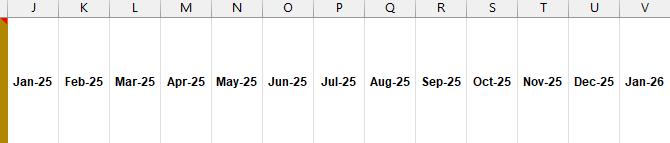
*
Current month formula:
=SUM(K2:V2)*
Next month formula:
=SUM(L2:W2)(since Feb‑26 will be in column W)
In short, every month the “Sum up values” column should always take the latest 12 month columns dynamically.
Request your help in implementing this.
Regards,
Madhusudhan J