Python Script in KNIME doesn’t recognize float values correctly - comparisons return wrong results
Hi everyone,
I’m using a Python Script node in KNIME to calculate a custom score based on a numeric column called
organic_etv.
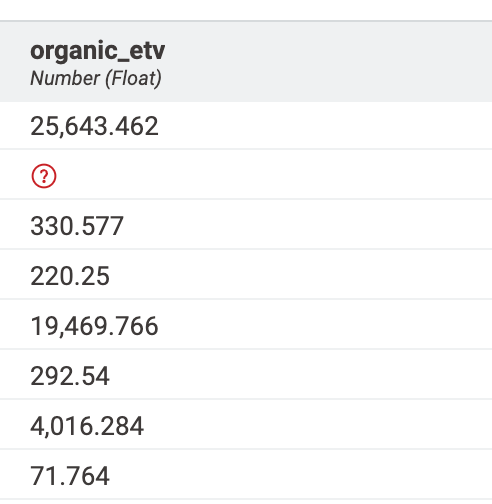
The column appears as
Number (Float)in KNIME, and the values look like this in the table preview:
However, when I run my Python script, the comparisons in my
ifstatements don’t seem to work correctly.
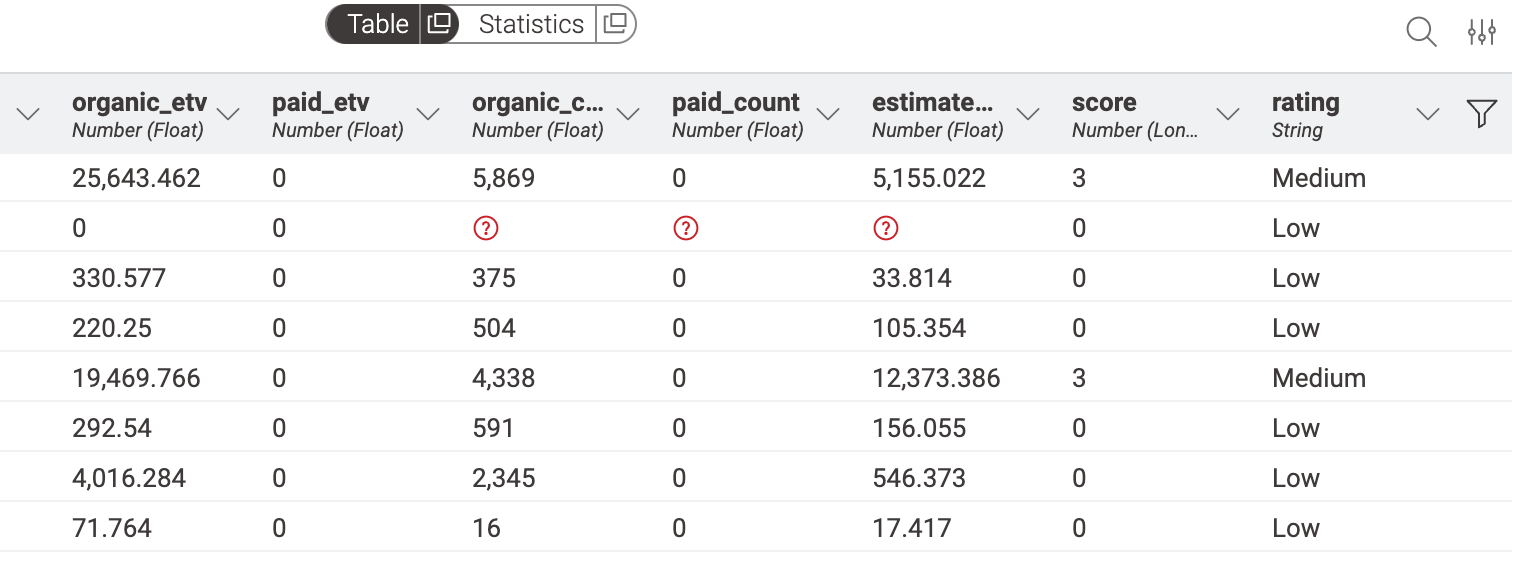
For example, the value
71.76399941369891should trigger the rule
elif etv < 50000: score += 3,
but it always results in a score of
0.
Here’s the simplified code snippet I’m using:
import pandas as pd
import knime.scripting.io as knio
df = knio.input_tables[0].to_pandas()
def calc_score(etv, paid):
score = 0
if etv < 5000:
score += 0
elif etv < 50000:
score += 3
elif etv < 500000:
score += 4
elif etv < 1000000:
score += 2
else:
score += 0
if paid > 0:
score += 1
return score
df["score"] = df.apply(lambda r: calc_score(r["organic_etv"], r["paid_etv"]), axis=1)
knio.output_tables[0] = knio.Table.from_pandas(df)
I’ve checked that the KNIME column type is Number (Float),
but maybe internally it’s still being passed to Python as a string?
Has anyone experienced this behavior where numeric columns from KNIME behave like strings inside Python?
And what’s the correct way to ensure that values are treated as proper floats for numeric comparisons?
Thanks in advance 🙏
— Philipp