Problem with setting a Python Deep Learning Environment
Dear all
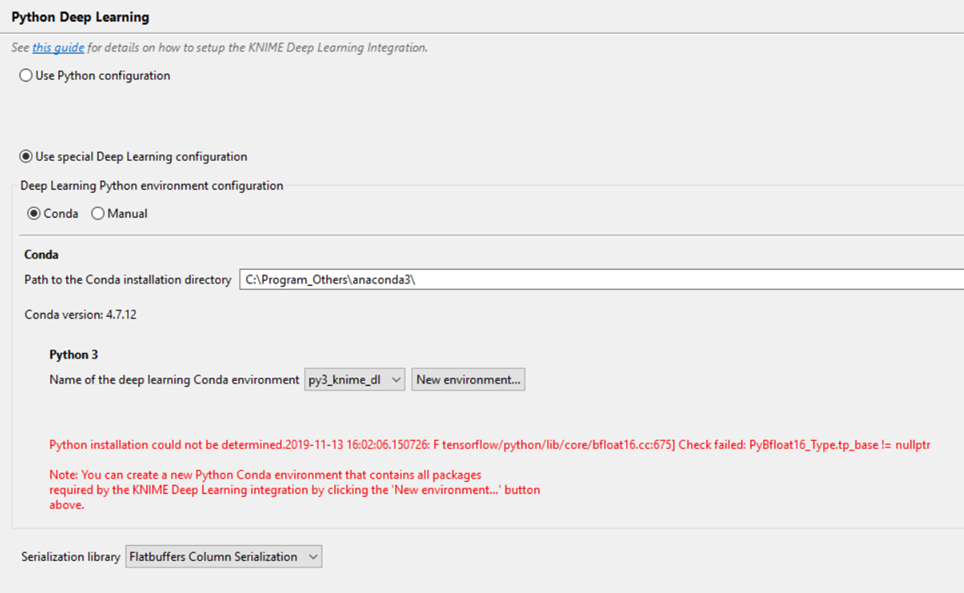
I’m facing a problem when trying to create a new Python Deep Learning Environment with Knime version 4.0.2 in a new laptop. The error message in red showed at the “Python Deep Learning Environment” setting window is :
“Python Installation could not be determined.2019-11-13 16:02:06: F tensorflow/python/lib/core/bfloat16.cc:675] Check failed: PyBfloat16Type.tpbase!= nullptr”
I followed the instructions given on the Knime web site to install from scratch the last version of Anaconda and then to create the Conda environment using Knime. I also did from scratch a fresh installation of Knime 4.0.2. to make sure everything was ok with both.
The problem arrives in both cases, CPU and GPU Python Deep Learning options. If a create the environment directly from Conda following again the recommendations in the Knime web site, the problem is still the same. If I try directly from Python the manually created environment as recommended by Knime and I do Import tensorflow, it crashes arguing that numpy version is not compatible, so I believe the underlying problem is with tensorflow version 1.12.0 and numpy. I tried to update both with more recent versions (i.e. 1.13.x) and it works in python but then it is not anymore compatible with the required versions by the DL Knime nodes which crash when I try to run them. To be sure that this is not a problem related with Knime version 4.0.2, I did the same tests with previous versions and the problem is the same.
Just for information, I have done this same installation in another computer exactly in the same way as initially mentioned and everything worked perfectly. Please find attached the Knime logs file for information.
Has anybody faced this problem before ? I would be grateful if I could have help to solve this issue. Many thanks in advance.
Best regards
Ael