PDF Table to Excel
Hi Knime Community, I have this type of PDF table where the value from one cell has 2 or more rows (it’s like a value that is in a merged cell). I did try the workflows that I found here (Thank you to the members who are kind enough to share their initial workflows) like the use of tika parser node to read the pdf file then use the cell splitter to split the contents and divide by columns, etc… Here’s my scenario:
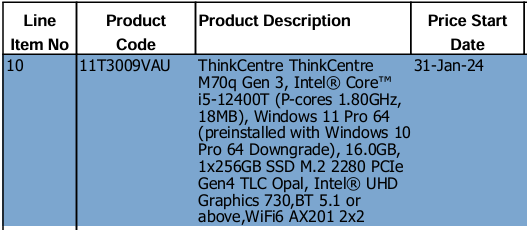
Sample Data header and cell value that uses 2 or more rows but combine as one (merge):
Scenario 1 that I try:
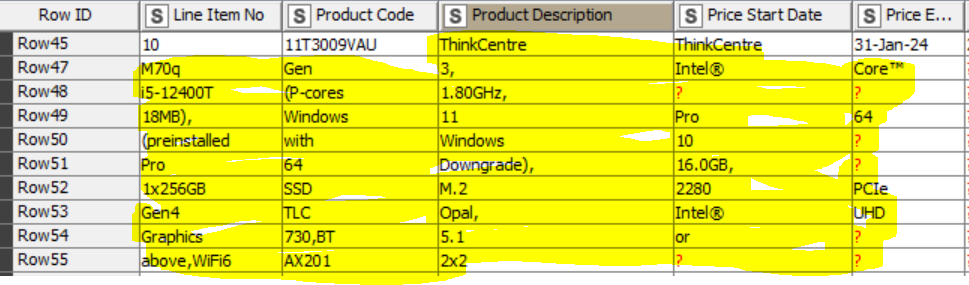
After using tika parser, cell splitter and transpose node; the value in the Product description wherein it uses many rows (merge) picks up by knime by row. I’m thinking of combining the column for Product Description + Price Start Date into one column, but how can I move the description that is in left columns?
Scenario 2 that I try:
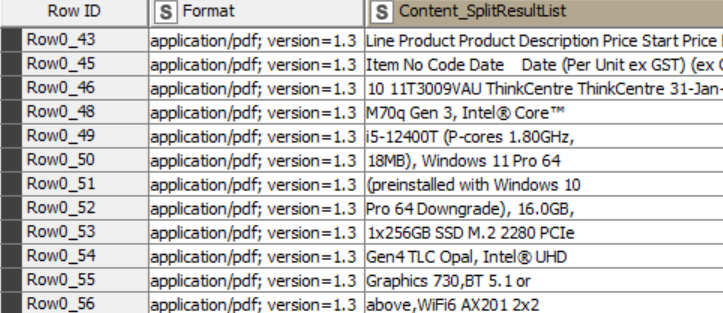
Tika parser - cell splitter content - ungroup then group by; it reads all the line in one row, How can I split the specific values per column (I suppose will use splitter and some type of pattern/numbering matching but I don’t know how will it pick up the other’s, it was my guess :sweat_smile:)