No example input data stored with component - how to further develop a locally stored component?
Hello Knime forum,
System setup
Knime 5.4.4
Windows 11
What do I want to do?
I have several self created components saved locally. If I want to change these components in any way I get the error message inside the component “No example input data stored with component”. That means, I cannot execute the component, nor can I change most of the nodes configurations, as no data is available.
How do I add “example input data” to that component in order to see what’s happening inside and to change the configuration of nodes, please?
Steps to reproduce
Create a component
Right click the component and choose “Share”
Save it locally
On the Knime navigation panel on the very left of the Screen, go to “Explorer” and look for the just created component
Open the component with a double click
The “Component Input” node has a warning message saying “No example input data stored with componentNo example input data stored with component”.
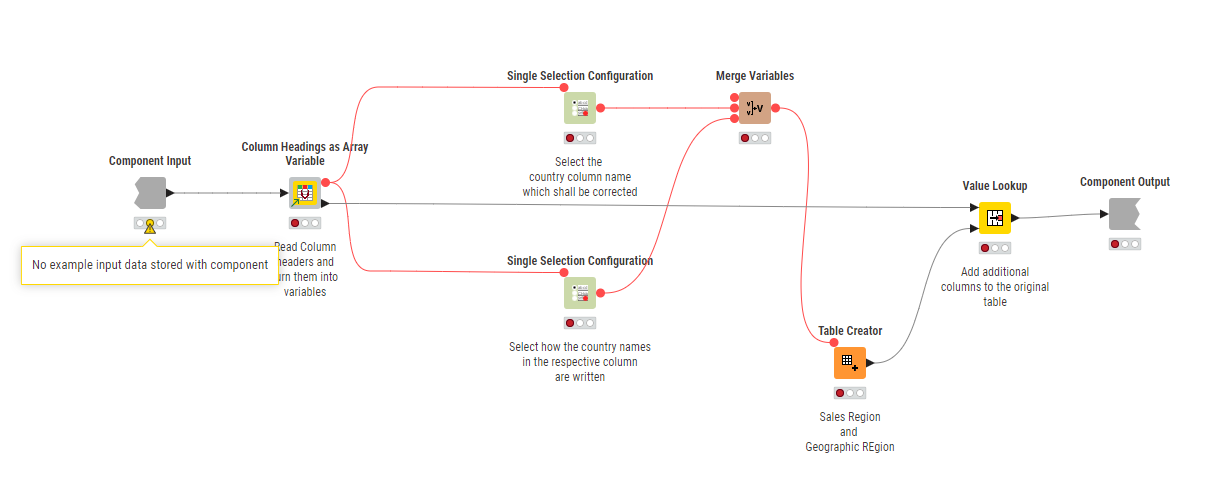
The only way to change the configuration I found so far, is
to copy all nodes from the component
paste them into a workflow where the component shall be used
link the input nodes with the main workflow
=> now I can change the configuration of the nodes. As soon as this is done
Copy all or just the changed nodes back into the component
Save the component
This workaround is obviously cumbersome and error prone.
So again :slight_smile:
How do I add “example input data” to that component in order to see what’s happening inside and to change the configuration of nodes, please?
Thanks a lot,
SebPen