KNIME Hub 1.14.1 Cannot Find SQL Server JDBC Driver SQL_Server_12
Dear KNIME Support Team,
We have encountered an issue when running a workflow on KNIME Business Hub 1.14.1.
Our environment and configuration are as follows:
KNIME Analytics Platform: 5.4.4
KNIME Business Hub: 1.14.1
Database: Microsoft SQL Server
JDBC Driver: Latest Microsoft SQL Server JDBC Driver
Driver ID: SQL_Server_12
Authentication: SQL Server username and password
In KNIME Analytics Platform 5.4.4, the SQL Server connection works correctly. We can successfully connect to Microsoft SQL Server using the SQL_Server_12 driver.
However, after uploading the same workflow to KNIME Business Hub 1.14.1, the workflow fails when we run it using an Ad-hoc Run.
The error message is:
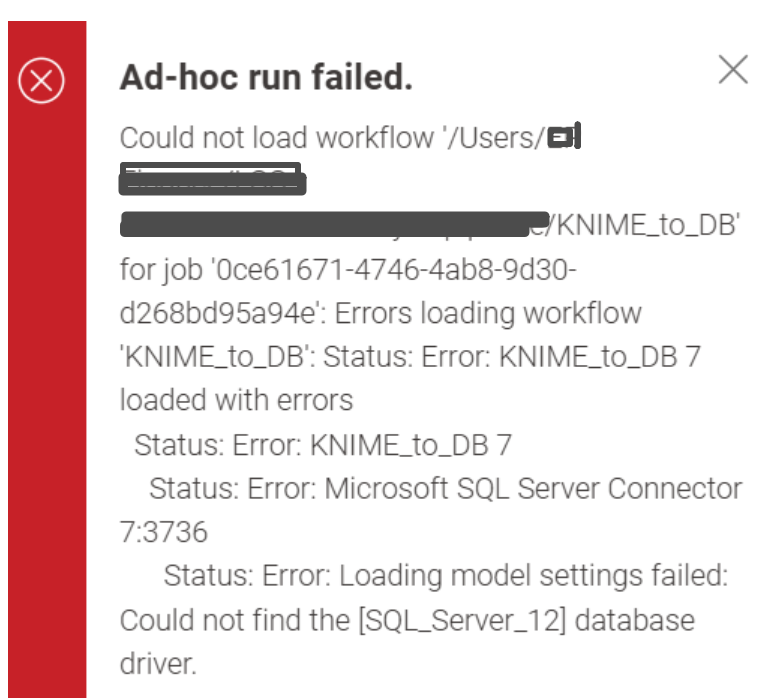
Ad-hoc run failed.
Could not load workflow
'/Users/****/KNIME_to_DB'
for job '0ce61671-4746-4ab8-9d30-d268bd95a94e':
Errors loading workflow 'KNIME_to_DB'
Status: Error: KNIME_to_DB 7 loaded with errors
Status: Error: Microsoft SQL Server Connector
7:3736 Status: Error: Loading model settings failed:
Could not find the [SQL_Server_12] database driver.
Our initial assumption is that the JDBC driver configuration registered in KNIME Analytics Platform is not available in the KNIME Hub Executor environment. The workflow appears to reference the driver by its ID SQL_Server_12, but the Hub Executor cannot find this database driver when loading the workflow.
Questions
Could you please advise us on the recommended solution for KNIME Business Hub 1.14.1? We would appreciate it if you could provide the recommended configuration and deployment approach for our environment.
Thank you for your support.