File reader fails even though successfully connected to google drive
I am wanting to connect to Google Drive to read and write files. I was able to successfully set up the Google Authenticator and Google Drive Connector Nodes.
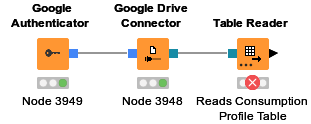
I followed the example of this workflow to connect to the file reader node (in my case, Table Reader) and set the file path accordingly. However I am getting a failed node and this error:
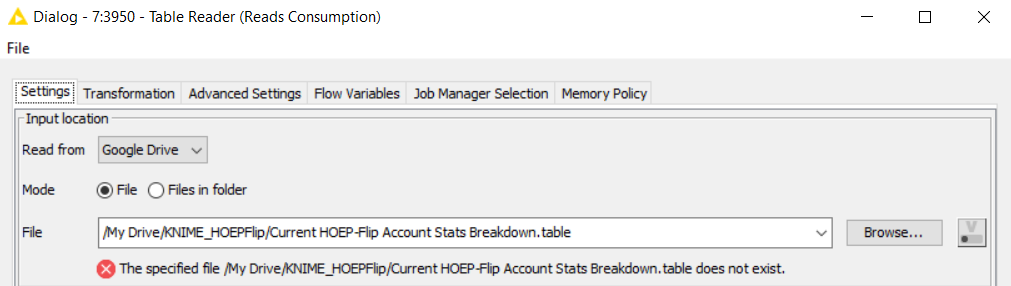
Execute failed: The specified file [path] does not exist.I don’t usually use the file system connection ports, so I’m not sure if I’m doing something wrong. I don’t know why it wouldn’t be able to access the file if the Google Drive Connector can successfully connect to the folder. I can even put the full file path in the Google Drive Connector and it successfully executes, but I no matter what, I cannot read the file with the Reader node. Does anyone have any insight to fixing this?
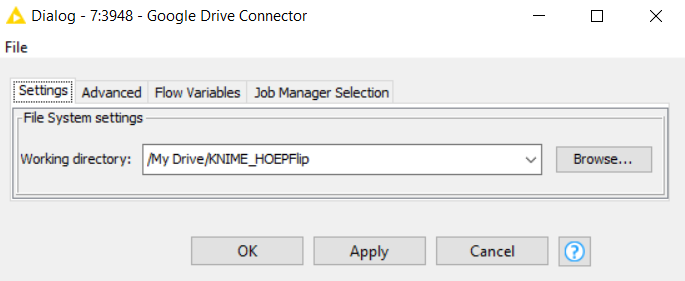
Here are my node settings:
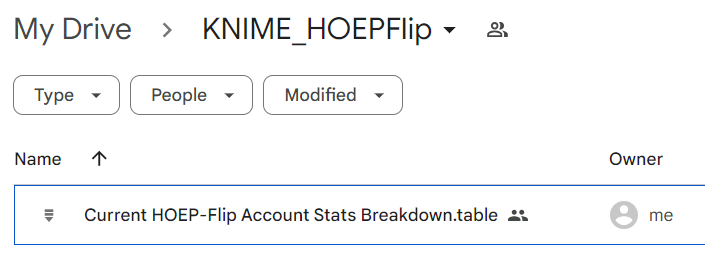
Here is proof of the file existing: