Excel Cell Updater Problem (string vs number)
Hi dear KNIMERs,
I recently encountered a problem with the Excel Cell Updater.
Per definition of how the Excel Cell Updater works, it probably nearly always contains multiple datatypes (like strings, numbers) because at the end of the day, if you fill more than just “one” column you might have more data.
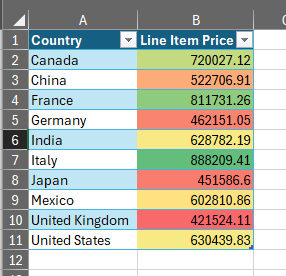
However, if you write in a pre-formatted Excel template (e. g. with conditional formatting and a color shading from green to red for highest to lowest values) this all does not work anymore.
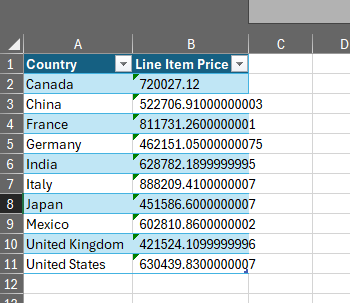
If you write the content “as is” Excel will return some strange errors.
If you convert them to e. g. string, all formatting gets lost, which in return renders the Excel cell updater useless (to use as a templating engine).
Here’s what it creates:
Here’s what it should create:
Here’s the example workflow for this:
Any idea how to solve this problem?