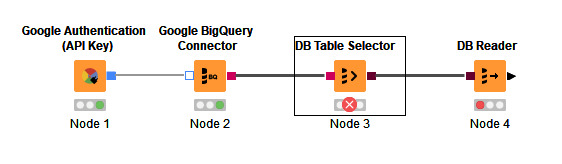
Error fetching columns (in DB Table Selector)
Hello,
I am a Knime beginner and work with version 4.7.2. I would like to establish a data connection between Knime and a database in Google BigQuery.
For the first steps I used the Google Authentication (API Key) and the Google BigQuery Connector. Up to this point there is no error message.
The problem then occurs with the DB Table Selector. After the Execute command, I get the following error message in the Knime Console:
“ERROR DB Table Selector 5:3 Execute failed: [Simba]BigQueryJDBCDriver Error executing query job. Message: Invalid project ID ‘niftystage144415’. Project IDs must contain 6-63 lowercase letters, digits, or dashes. Some project IDs also include domain name separated by a colon. IDs must start with a letter and may not end with a dash.”
A vague assumption is that the database name (which contains dashes) may be a problem. In contrast, the above mentioned project ID in the error message contains underscores.
In the Google BigQuery Connector, I have entered nifty-stage-144415 in the Database name field under Connection Settings.
In the DB Table Selector (in the Settings), I also entered nifty-stage-144415 in the database field. I have also filled in the Schema field. In “Select a Table” I can also see the existing table names of the database, but when I want to select a table, I am told “Error fetching columns (for details see tooltip).”
Does anyone have any idea what the problem is and how I can fix it.