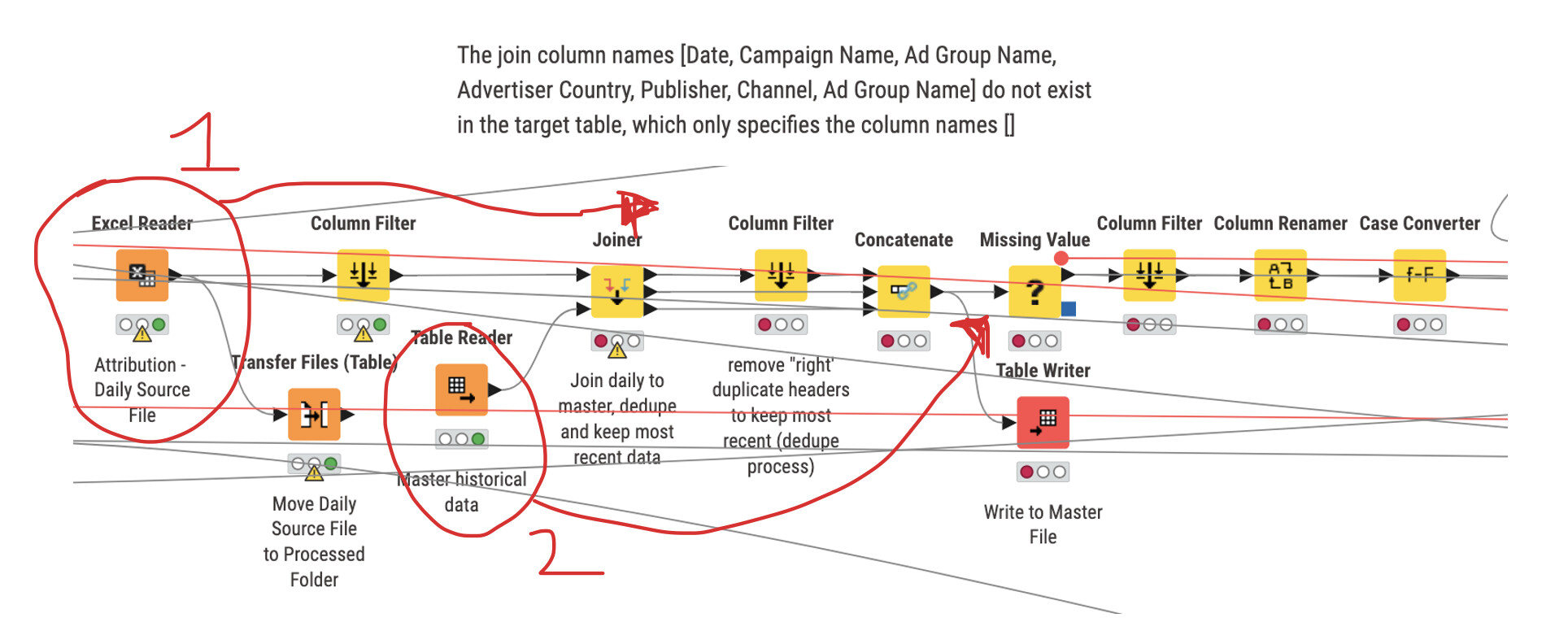
Determine which path in workflow if no data exists in one stream (IF switch?)
I have a workflow where I have several paths to ETL then union all feeds together. I have roughly 8 data sources - most I can grab through an API or Google Sheets, but there are a handful that get emailed to me daily or I have to download due to no API. I copy these files into a Dropbox folder. I take these data sources (usually last XX days to update any data items that may have changed (ie, Google Analytics as the day progresses). I join this file to a “master table” that I’ve created and saved locally, where the new data source overwrites any duplicates (joined). I then move the daily report to a ‘processed’ folder that empties the source folder and retains a history of the data files.
One of the files is now blank - data doesn’t populate daily. However, when that blank file joins to the master, the nodes are coming ‘red’. I (believe I) know that an IF switch should be used, but how would I incorporate that? What I would expect the workflow to indicate is something to the effect of: “If the daily source file is blank, then just pass the master table after the joins. If there is data in the daily source file, then join to the master table to dedupe and add the most recent data and pass through the workflow”
(All of the lines are from the other portions of the workflows that write to a Tableau file - side note; wireless connectors would be fantastic).
In below’s image - IF there is data in the daily source file data, THEN join to the master table and process through (path 1).
IF there’s no daily source file data, THEN ignore path 1 and use path 2 - passing the master table data through to the missing values node and continue as usual, bypassing the join, filter, and concatenate nodes.
Is this possible?