Bug in Table Difference Finder?
I try to use the Table Difference Finder to compare two tables. But it struggles comparing doubles. Here is a simple example:
Input:

This gets split up into two tables and compared. The output is 10 and 10.0 are different.

Even if I round the numbers down to 0 decimal places, it still fails. Here is the workflow:
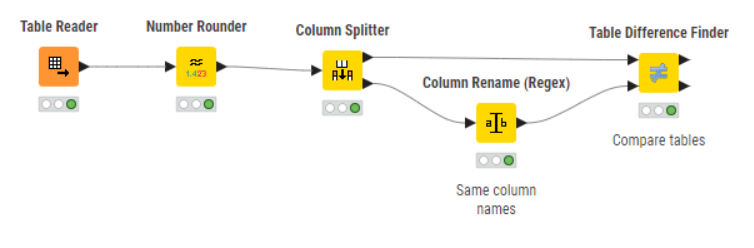
I know about IEEE 754 floating point representation and the errors which can occur there. That’s why I tried to round the number. But even if I round it to 0 decimal places it does not work. It fails even when rounded to 1 significant digit. (For my application, 4 decimal places would be enough). A Number like 10.0 should also have only a single IEEE 754 representation.
The comparison works correctly, if I do a “Math Formula (Multi Column)” on each double column where I add 0.0. (Formula:
$$CURRENT_COLUMN$$ + 0.0)
I don’t get where the problem is. Any ideas?
Here is the full workflow: